Jewelry CAD Checklist Before Casting: Minimum Thickness, Prongs and Clearances
Eight checks for a ring CAD file before it goes to print and cast, with three casting suppliers' published minimums side by side and how to check each in Rhino.
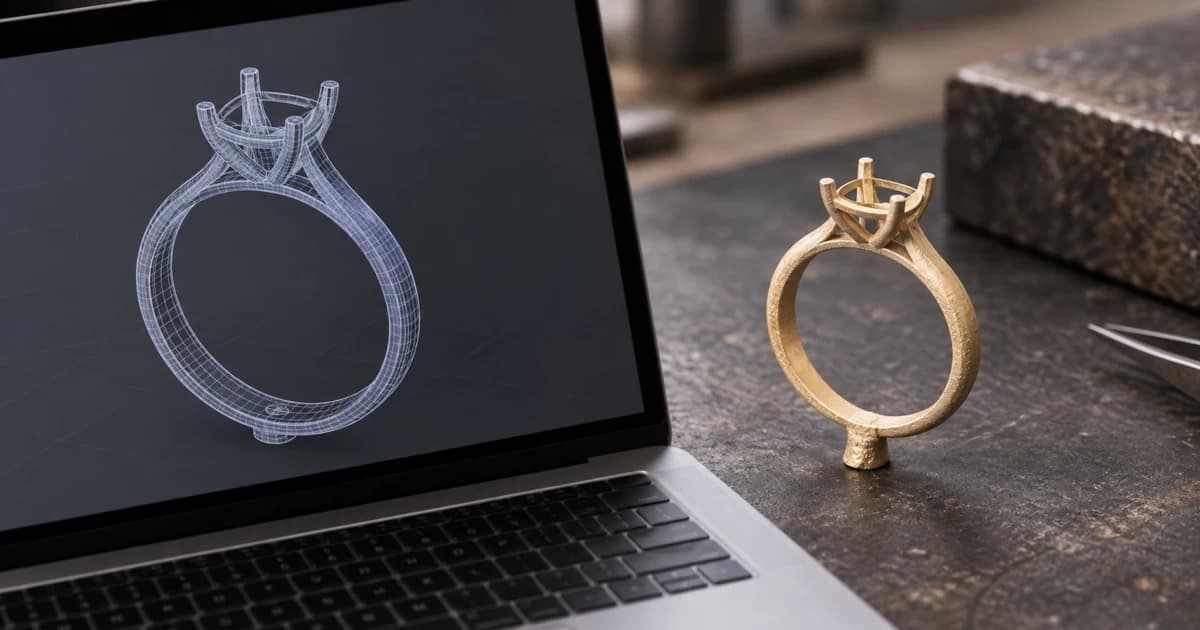
A jewelry CAD casting checklist comes down to eight checks. The file must be a closed solid with only metal in it. Walls, prongs and openings must meet your caster's minimums, the stones must clear the finger, the text must be within limits, and the size must match the order. The catch is the word "minimum". Casting suppliers publish different numbers for the same feature, and polishing takes some of that metal away after casting.
This guide puts three suppliers' published minimums side by side, explains where they disagree, and shows how to check each item in Rhino (and so in MatrixGold, which comes with it) before the file leaves your desk.
The eight checks, in the order to run them
Closed solid. No naked edges, no non-manifold edges, normals facing out. Nothing else on this list can be measured until this passes.
Only metal in the file. Stones, cutters, sprues, tie bars and reference curves on their own layers, so they don't print or skew the weight.
Wall and shank thickness. Structural walls at 0.7–0.8 mm or more, as your caster asks; the shank thicker still.
Prongs, claws and bezels. At or above your caster's minimum for small details, with extra for finishing.
Openings and holes. Wide enough to cast, and no deeper than twice their width.
Stone clearances. The culet (the point at the bottom of the stone) at least 0.5 mm clear of the finger; prongs overlapping the girdle by as much as your caster asks.
Text and milgrain. Raised and recessed letters within the limits below.
Size and weight. The ring size in the file matches the order, and the metal weight is what you quoted. Ask your caster whether they expect the model at the finished size or with an allowance for shrinkage and finishing, and set the file their way. Our guide to calculating metal weight from the CAD file covers that last step.
Published minimums from three casting suppliers
These are the figures each supplier publishes for its own process. Stuller's are from the edition of its CAD/CAM Production Standards guide that Stuller links today (the file is dated December 2022), read on 15 October 2026. An older 2016 copy still circulates online with different numbers, so check which edition you have. Cooksongold's are from its precious-metal casting design guidelines and Materialise's from its design guidelines for gold, both read on 15 October 2026.
Feature | Stuller (CAD/CAM) | Cooksongold | Materialise (gold) |
|---|---|---|---|
Structural or external walls | 0.7 mm (side walls of hollow outs); 0.40 mm (pinpoint outside walls) | 0.8 mm | 0.8 mm |
Ring shank | 1.50 mm wide and 1.50 mm thick | — | 1 mm for a ring band |
Small details, scrollwork | 0.50 mm (scroll designs) | — | 0.35 mm diameter, 0.4 mm high (smallest features, such as micro pavé) |
Prongs and claws | 0.35 mm diameter (pinpoint and shared-prong settings) | 0.5 mm (claws, small bezels) | 0.8 mm diameter (rods or prongs in mesh-like structures) |
Bezel wall | 0.40 mm, with a seat at least 0.45 mm long | 0.5 mm (small bezels) | — |
Openings and holes | 0.50 mm (scroll designs); depth no more than double the diameter | 0.5 mm | Over 1.5 mm (holes to drain hollow models) |
Gaps between parts | Gallery rails 0.50 mm apart | — | 0.3 mm gap between separate parts |
Culet to finger rail | 0.5 mm | — | — |
Raised letters | 0.3 mm wide, raised 0.3–0.5 mm, 0.3 mm apart | 0.3 mm thick, up to 0.6 mm high, 0.3 mm apart | height no more than width (1:1) |
Recessed letters | 0.3 mm wide, 0.3 mm apart, depth no more than double the width | 0.3 mm thick, up to 0.5 mm deep | depth no more than width (1:1) |
Finishing | Adds 0.30 mm to shank width or thickness when a set size is asked for | Finishing removes "approximately 0.1mm" | Polishing erodes "about 0.1 to 0.15 mm" |
A dash means that supplier's guide doesn't give a figure for it. Stuller also asks for channel-setting walls of at least 0.50 mm (0.60 mm for princess stones).
Why the numbers differ, and which one to use
Cooksongold and Materialise agree on 0.8 mm for structural walls; Stuller asks for 0.7 mm on the side walls of hollowed-out pieces. The gap is wider on small details: a prong can be 0.35 mm at Stuller, 0.5 mm at Cooksongold and 0.8 mm at Materialise. Materialise's figure is 60 % thicker than Cooksongold's, and more than twice Stuller's. Yet Materialise also allows 0.35 mm for its smallest features, such as micro pavé settings: the same figure as Stuller's.
The context explains most of it. Stuller's 0.35 mm is for the prongs of pinpoint and shared-prong settings, which its guide lists under melee (small stone) settings. Materialise's 0.8 mm is for longer rods and prongs in open, mesh-like gold structures.
Then there's finishing. Cooksongold says finishing "can remove approximately 0.1mm", adding that "this depends on the processes used"; Materialise says its polishing will "erode your model by about 0.1 to 0.15 mm". Neither says whether that's per surface. A 0.5 mm claw that loses 0.1 mm could end at 0.4 mm; if it loses 0.1 mm on each side, 0.3 mm. Stuller builds the allowance into the model: when a customer asks for a set shank size, it adds 0.30 mm to the width or thickness, so a shank that must finish at 1.50 mm wide is made at 1.80 mm. So a model built exactly at a minimum can finish below it. Materialise's advice is to "take the amount of erosion from these finishes into account when you are designing your model".
Which to use: your own caster's figure, always. Without one, our advice is to use each figure only for the feature it was written for: Stuller's 0.35 mm for pinpoint and shared prongs on melee, Materialise's 0.8 mm for long, open wire work. Then add a finishing allowance on top. Ask the caster for their sheet before the first job, not after the first failed cast.
Openings: no deeper than twice their width
Stuller's guide gives a rule most checklists skip: an opening (a pilot hole under a stone, a gap in a gallery, a recessed letter) can be added "if the depth of the opening is no more than double the diameter". If the opening is too narrow, Stuller says, "it causes casting defects such as investment relocation": the investment (the mould material cast around the wax) shifts inside the opening.
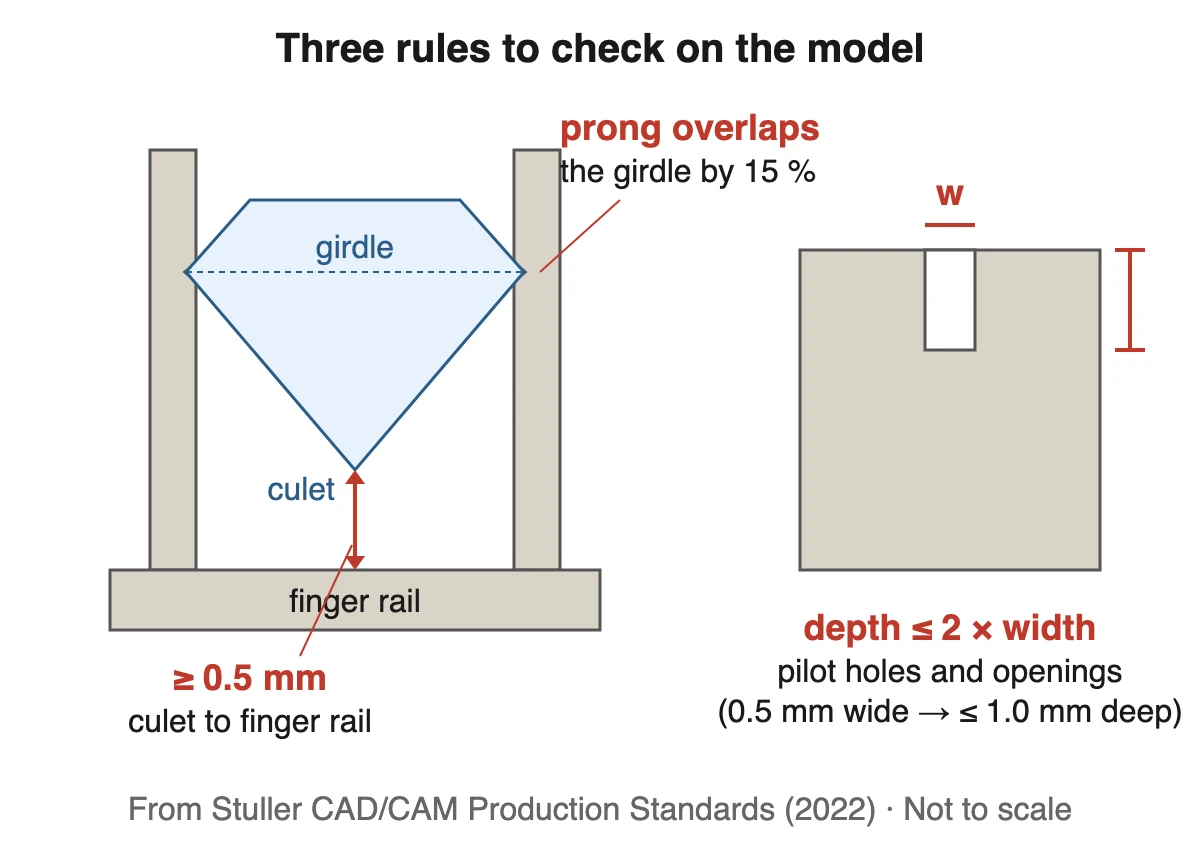
The rule turns into quick limits:
Opening width | Deepest it should go |
|---|---|
0.5 mm (Stuller's scroll openings, Cooksongold's holes) | 1.0 mm |
1.0 mm | 2.0 mm |
Stuller's own example shows why. A 1.00 mm pilot hole 1.80 mm deep is marked "Good width". The same 1.80 mm depth at 0.50 mm wide is marked "Too narrow": it's 3.6 times deeper than it is wide. Where a pilot hole can't be added, Stuller uses a divot instead.
Stones: clearance, prong overlap and spacing
Three rules from the same guide cover most settings:
Culet clearance: "Stone must have a minimum clearance of 0.50mm from the culet of the stone to the finger rail."
Prong overlap: in a center prong setting, "The prong has to overlap the girdle of the stone 15%." The girdle is the stone's widest edge. Stuller asks the same 15 % of pinpoint, shared-prong and faux pavé prongs.
Spacing: pinpoint-set stones at least 0.15 mm apart, girdle to girdle, and channel-set stones 0.10 mm. A peek-a-boo stone at least 0.20 mm above the finger rail, and 0.20 mm of metal above the ring rail where there's milgrain.
How to check each item in Rhino or MatrixGold
Stuller sells MatrixGold with "a Rhino 8 upgrade" and lists "full integration with Rhino 8", so these Rhino commands are there in MatrixGold too.
Check | How to check it | What a failure looks like |
|---|---|---|
Closed solid |
| Highlighted edges. The printer and the volume can't be trusted until they're gone |
Mesh files (STL, OBJ) |
| Any count above zero |
Only metal | Turn off every non-metal layer, then select what's left. Remember | A volume that changes when you show or hide layers |
Wall, prong and bezel thickness |
| Anything below your caster's figure plus a finishing allowance |
Openings |
| Depth more than twice the width |
Culet clearance | Section through the stone center, then | Less than 0.5 mm |
Text |
| Under 0.3 mm, or taller/deeper than the limits |
Measuring all of this by hand, ring after ring, is the job Culet Studio's inspection report was built for. Drop in a 3DM, STEP, STL or other CAD file, and it checks for a watertight solid, loose fragments, 0.5 mm minimum thickness, culet clearance, stones through the bore, stone gaps, intersecting girdles and the sizing area. It also separates hidden MatrixGold layers, sprues, tie bars and order-number text from the piece. The file is measured in your browser and stored only if you save it to your Drive, share it by link, or export a live 3D or 360° view. It doesn't replace your caster's sheet: its thickness check uses 0.5 mm, so a caster who asks for 0.8 mm still needs the manual check above.
What to send the caster
Stuller prefers 3DM NURBS files "not unioned/joined; not one solid mesh" and accepts STL. It asks you to leave the stones in the file or, if your software can't, to give all the stone sizes. Cooksongold asks for a high-resolution STL. Two more limits from Cooksongold are worth knowing before you model: earring posts aren't printed (they're soldered on afterwards), and sharp edges should be softened to about a 0.3 mm radius. Materialise doesn't accept interlocking parts such as chains for lost-wax casting.
So check the format with your caster first, and send the stones in their own layer unless they say otherwise. Culet Studio opens the main CAD and mesh formats, including MatrixGold files saved without render meshes, if you want to look at the file the way the caster will.
Before the file goes out
If you only have time for three checks, our pick is the closed solid, the thinnest prong against your caster's number plus finishing, and the culet clearance. A fault in any of them is in the metal once it's cast. Then confirm the size and the weight against the order.
If you check files from several designers or suppliers every week, the manufacturers' page shows how the inspection report checks size, weight and casting problems the moment a file arrives. Or open a file in Culet Studio and run the checks on your next ring. It's free, with no usage limits.
Related Articles
View All Blogs
October 29, 2026
Free Jewelry Design Software: What Each Free Tool Can and Can't Do
Blender, FreeCAD, Fusion, Onshape, SketchUp and the paid-CAD trials, checked against each maker's own terms: commercial use, STL export and time limits.
October 27, 2026
Jewelry Design Software Compared: Rhino, MatrixGold, 3Design and More
Rhino, MatrixGold, 3Design, ZBrush, Blender and Fusion compared from each maker's own site: price, platforms, file formats, jewelry tools, and what your caster needs.
October 15, 2026
STL File Viewer Online: Free Tools for Jewelers, and Which Upload Your File
Free STL viewers compared from their own pages: which keep a client's design in your browser, which measure it, and the checks a jewelry STL needs once it's open.